WatchBuddy: The Apple Watch Battery Widget Apple Didn’t Ship
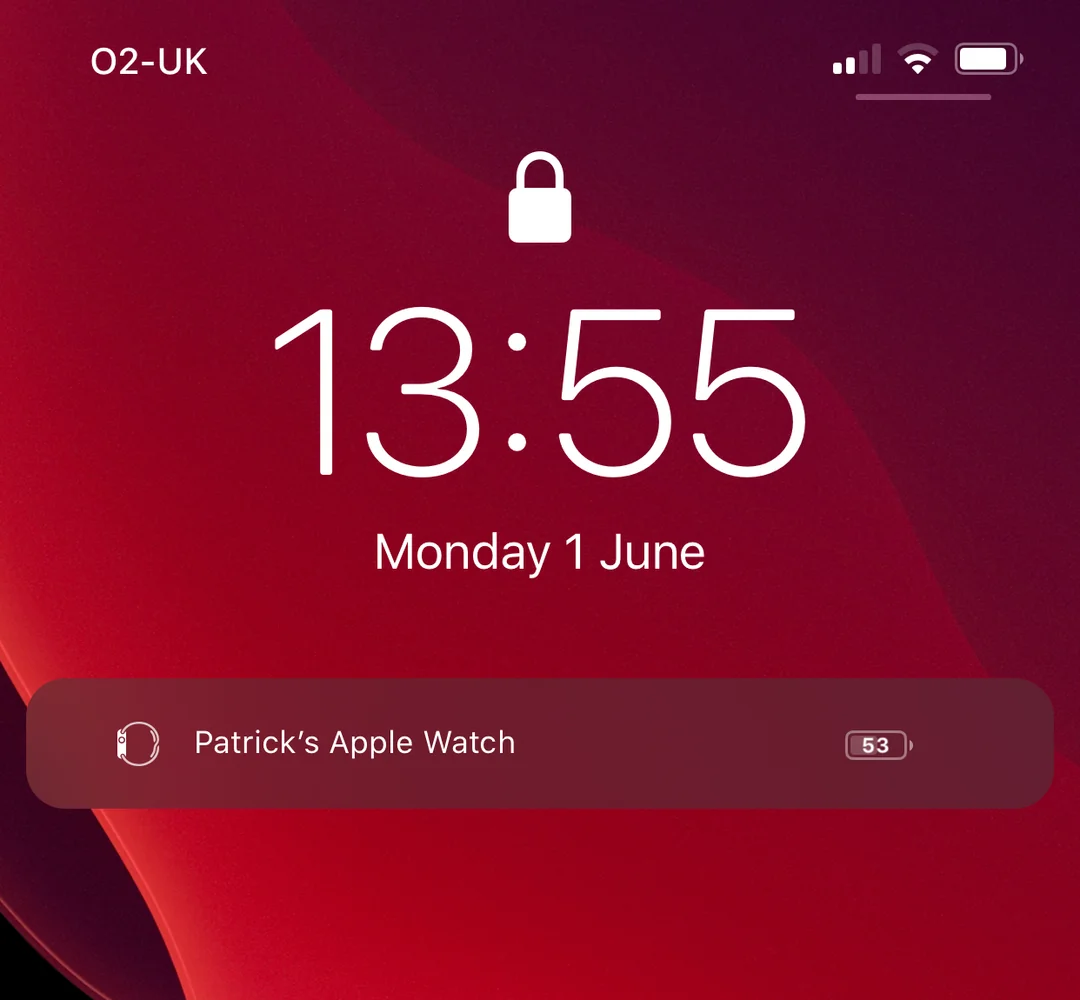
I built WatchBuddy years ago because I kept asking the same question: why can I not just pin my Apple Watch battery on the iPhone home screen?
At the time, there was no native experience that felt right for what I wanted.
Apple has since shipped better battery visibility, but this project still means a lot to me. It was my first real introduction to reverse engineering.
It was the first time I took apart someone else's tweak patterns, read private-framework headers, tested assumptions, and then turned that understanding into a feature I actually used every day.
This is also a very old project now. Looking back at the code, I cringe a bit because I can see plenty of rough edges and mistakes. But I am still proud of it, because it was a turning point in how I learned to build and debug systems I did not originally write.
This post is a breakdown of the core implementation: where I hooked in, how I read battery data, and how I kept the UI in sync.
Architecture (high level)
- Battery event trigger:
BCBatteryDevice.setPercentCharge:is called when iOS updates a device charge value. - Update signal: the hook emits a local
percentUpdatenotification so UI can react immediately. - UI listener:
CSNotificationAdjunctListViewControllerreceivespercentUpdateand callsupdateBatteryData(). - Data fetch:
updateBatteryData()reads fromBCBatteryDeviceController.sharedInstanceand iterates_sortedDevices. - Target resolution: the correct watch is identified by matching against the configured
deviceIdentifier. - Render step: on the main thread, WatchBuddy updates
_UIBatteryView.chargePercentand refreshes the label/glyph.
The key design decision was event-first updates: react to real battery change events, then render immediately.
1) Hooking lock screen UI entry point
The tweak injects into CSNotificationAdjunctListViewController and builds a custom row inside viewDidLoad.
%hook CSNotificationAdjunctListViewController
-(void)viewDidLoad{
  %orig;
  UIStackView *stackView = [self valueForKey:@"_stackView"];
  // create WatchBuddy row and inject into lock screen adjunct stack
  [stackView addArrangedSubview:watchbuddy];
  [[NSNotificationCenter defaultCenter] addObserver:self
                                           selector:@selector(percentUpdate:)
                                               name:@"percentUpdate"
                                             object:nil];
}
%end
Why this matters:
- it hooks the exact lock screen controller that owns the adjunct notification stack,
- it injects UI directly into that stack with no extra host view controller,
- and it subscribes to battery-driven notifications for immediate redraws.
Hook references
CSNotificationAdjunctListViewController: commonly used by lock screen tweak projects as the CoverSheet adjunct/stack host (example headers and hooks: Axon Tweak.h, Axon Tweak.xm).BCBatteryDeviceController/BCBatteryDevice: documented in public reverse-engineered headers used by tweak developers (theos/headers BatteryCenter, iOS-Runtime-Headers BCBatteryDeviceController, iOS-Runtime-Headers BCBatteryDevice).- Logos hook directives used here (
%hook,%orig,%ctor,%init) are defined in Theos Logos syntax docs.
2) Reading battery from internal device controller
The battery feed comes from BCBatteryDeviceController internals.
BCBatteryDeviceController *bcb = [%c(BCBatteryDeviceController) sharedInstance];
NSArray *devices = [bcb valueForKey:@"_sortedDevices"];

for (BCBatteryDevice *device in devices) {
  NSString *deviceName = [device valueForKey:@"_name"];
  NSString *deviceCharge = [NSString stringWithFormat:@"%@", [device valueForKey:@"_percentCharge"]];
  if ([[deviceName lowercaseString] containsString:[deviceIdentifier lowercaseString]]) {
    long long chargePercentInt = [deviceCharge intValue];
    batteryview.chargePercent = chargePercentInt / 100.0;
  }
}
The hard part here was confidence: figuring out which internal objects were stable enough to trust, then mapping their values safely into _UIBatteryView.
3) Hooking charge updates (Bluetooth-driven refresh)
Polling felt sloppy, so I hooked BCBatteryDevice directly and reacted to charge changes.
%hook BCBatteryDevice
-(void)setPercentCharge:(long long)arg1{
  %orig;
  [[NSNotificationCenter defaultCenter] postNotificationName:@"percentUpdate" object:nil];
}
%end
The UI controller listens for percentUpdate and redraws on demand.
That gave WatchBuddy a much more native feel than timer-driven refreshes.
4) Device matching and reliability
A practical issue was multi-device noise. Lots of accessories report battery, so I match against a user-configurable identifier from tweak preferences.
deviceIdentifier = [prefs objectForKey:devicename];

if ([[deviceName lowercaseString] containsString:[deviceIdentifier lowercaseString]]) {
  // treat as target watch
}
This kept matching predictable while still supporting custom watch names.
5) Runtime toggles and safe init
The tweak is preference-gated and only initialized in %ctor when enabled.
%ctor {
  CFNotificationCenterAddObserver(..., CFSTR("com.paddycodes.watchbuddy/ReloadPreferences"), ...);
  reloadPrefs();
  if (tweakEnabled) {
    %init(tweakCode);
  }
}
That kept the hook footprint small and made iteration safer while I was learning.
Full source code
If you want to inspect the entire original tweak file, I have published it here:
Pitfalls I hit (and how I handled them)
- Private API volatility: internal property names are not contract-stable, so I isolated lookups and kept logging around key paths.
- Race conditions on first render: immediate reads in
viewDidLoadwere sometimes stale, so I delayed the first refresh by 300ms. - Multiple battery devices: AirPods and other accessories polluted the list, so I added preference-based device matching.
- UI thread safety: battery events can arrive off main thread, so UI updates are wrapped in
dispatch_async(dispatch_get_main_queue(), ...). - Stale "not found" state: once a watch match is found, the widget should not regress to fallback text within the same pass.
Closing thoughts
Looking back, this was less about shipping a widget and more about learning how to think.
The UI was the visible layer. The real work was understanding timing, data ownership, and private object behavior well enough to make the result feel native.
Apple eventually shipped similar battery visibility, which honestly validated the original problem.
But the bigger win for me was the process: inspect behavior, verify assumptions, and turn low-level internals into user-facing product value.